Point of sale
Selling & drawer flows
How the till's main flows work in code: browse, scan, modifiers, basket pricing, discounts, tender, receipt and the drawer lifecycle.
Browsing
SellScreen.tsx lays out three columns: browse, product grid, and cart (26rem wide).
- Sections (
SectionTiles.tsx):- Colour-tinted, nested tiles. A layers icon marks a section that contains sub-sections, and breadcrumbs keep each section's colour.
- A shop with no sections drops non-managers back to All products.
- All products (
CategoryPane.tsx,useCategoryLevels):- The tree stays expanded, and siblings stay visible.
- Tapping an open category climbs back up.
- Every level shows products, including descendants.
- Manage sections (
SectionManager.tsx, gated bycanManageSections):- A two-pane dialog to create, rename, recolour (9 tints) and reorder sections, and to move them by "pick up → Move here".
- Add or remove products, and delete sections.
- Every change persists immediately.
Search & scan
The search field holds focus permanently, except while a dialog is open, so a hardware scanner always types into it.
keystrokes ──► ≥ 6 chars typed in < 120 ms, ending in Enter?
                 ├─ yes → lookupBarcode (exact) → add line, or toast "No product with barcode …"
                 └─ no  → debounced 200 ms shop-wide search
                          Enter with exactly 1 result → add it
Typed search ignores the selected category or section.
Product tile
ProductTile.tsx shows:
- the effective price, with the list price struck through
- "N left" when 1–10 units remain (untracked stock,
null, is never badged) - Sold out, greyed, when stock ≤ 0 and overselling isn't allowed
A separate ⓘ button opens ProductDialog.tsx without another fetch. It works even when the product is sold out.
Modifiers
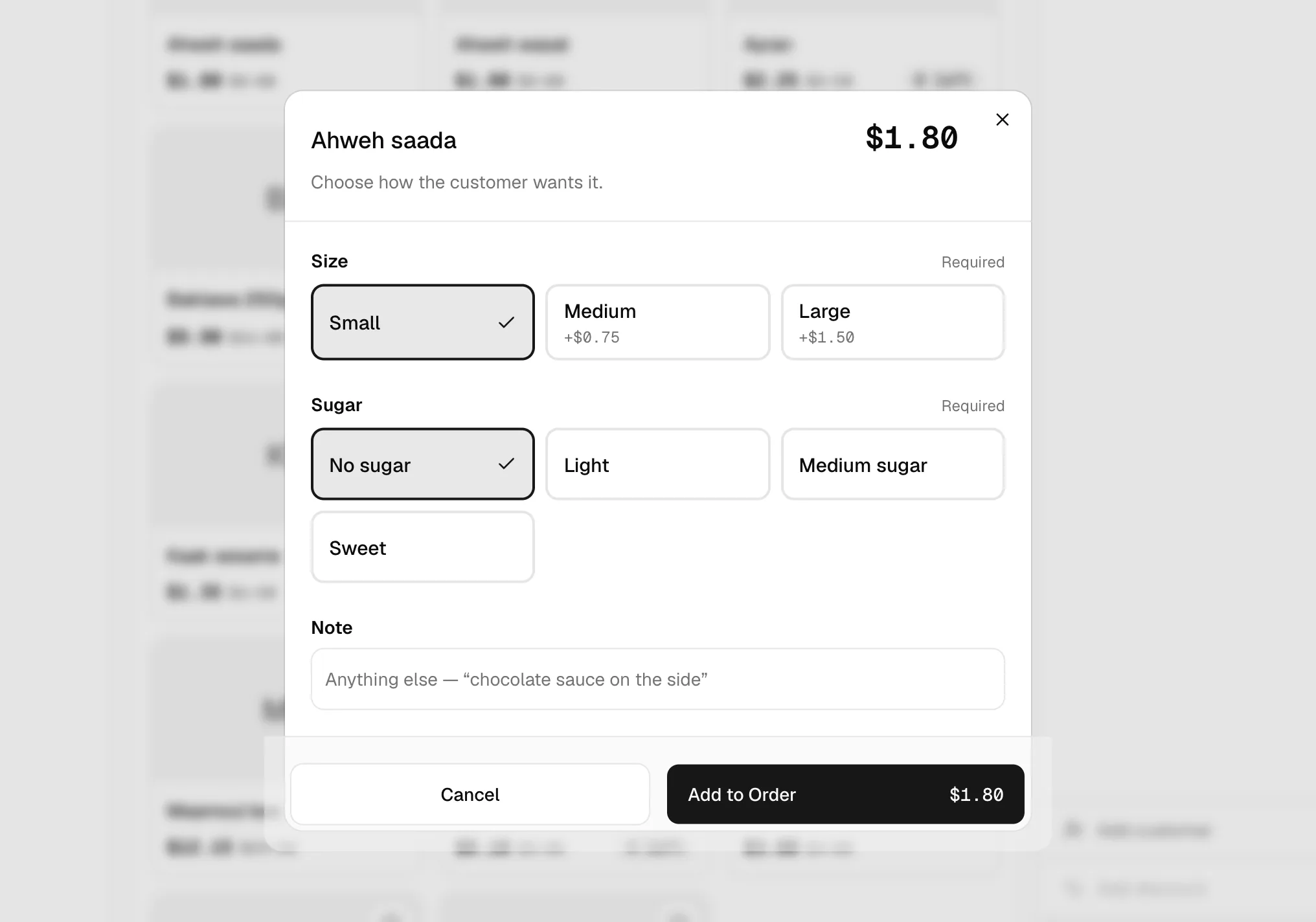
ModifierSheet.tsx opens when a product has modifierGroupIds:
- Required groups come first.
- Each group is a radio (max 1) or a checkbox list up to its max.
- Defaults are preselected.
- The running price is announced via
aria-live. - There's an optional note (500 characters).
- Add stays disabled until every required group is satisfied, and the button explains why ("Choose Milk").
Line identity: a plain re-add of the same variant increments the quantity. A configured add always creates a new line.
Basket pricing
priceCart() in state/cart.ts mirrors the server:
- The line unit price comes from the effective price plus modifier deltas.
- Tax is calculated per line, on taxable lines only, inclusive or exclusive per till (
taxRate,taxesIncluded). - The manual discount comes off last, capped at the basket total.
- Promo codes are not priced on the till. They're shown as "Code X — applied at checkout", and an unknown code stops the sale on the server.
The quantity stepper is capped at stock unless stock is untracked or overselling is allowed. The basket is read-only while a sale is in flight.
Discounts
DiscountDialog.tsx offers two kinds of discount:
- Promo code: uppercased, then validated by the server at
createOrder. - Manual discount:
- The cashier enters a % or an amount (over 100% is blocked) and a required reason (255 characters), and sees a "Comes off −$x" preview.
- A masked 6-digit PIN is checked on the sixth digit through
verifyDiscountPin, which shows "Approved by {name}". - The PIN is sent again with the sale.
DISCOUNTS_ENABLED = true in CartPane.tsx.
Tender
TenderDialog.tsx, SplitPayment.tsx, lib/tender.ts:
| Tender | Input | Sent as |
|---|---|---|
| Cash | Amount, quick buttons (Exact, 5, 10, 20, 50, 100). Enabled when it covers the total rounded half-up to the cent (roundToCents, covers). | cash with an amount |
| Card | Confirm only | card without an amount |
| Whish | Confirm only | wallet without an amount |
| Split | The cash part (quick: Half, round notes), with the rest by Card or Whish | cash with an amount + card/wallet without, and the server fills the remainder |
- Nothing is preselected. A back arrow changes the tender without losing the basket.
- Idempotency: one UUID per basket, rotated only after success. On
idempotentReplaythe screen shows "Already completed" and the receipt prints REPRINT. - After the sale: the order number, a breakdown, the total, the split parts and the change due. Print or New sale (focused), where New sale clears the cart, customer and discounts.
There's no card-terminal or gateway integration; Card and Whish are recorded only.
Receipt
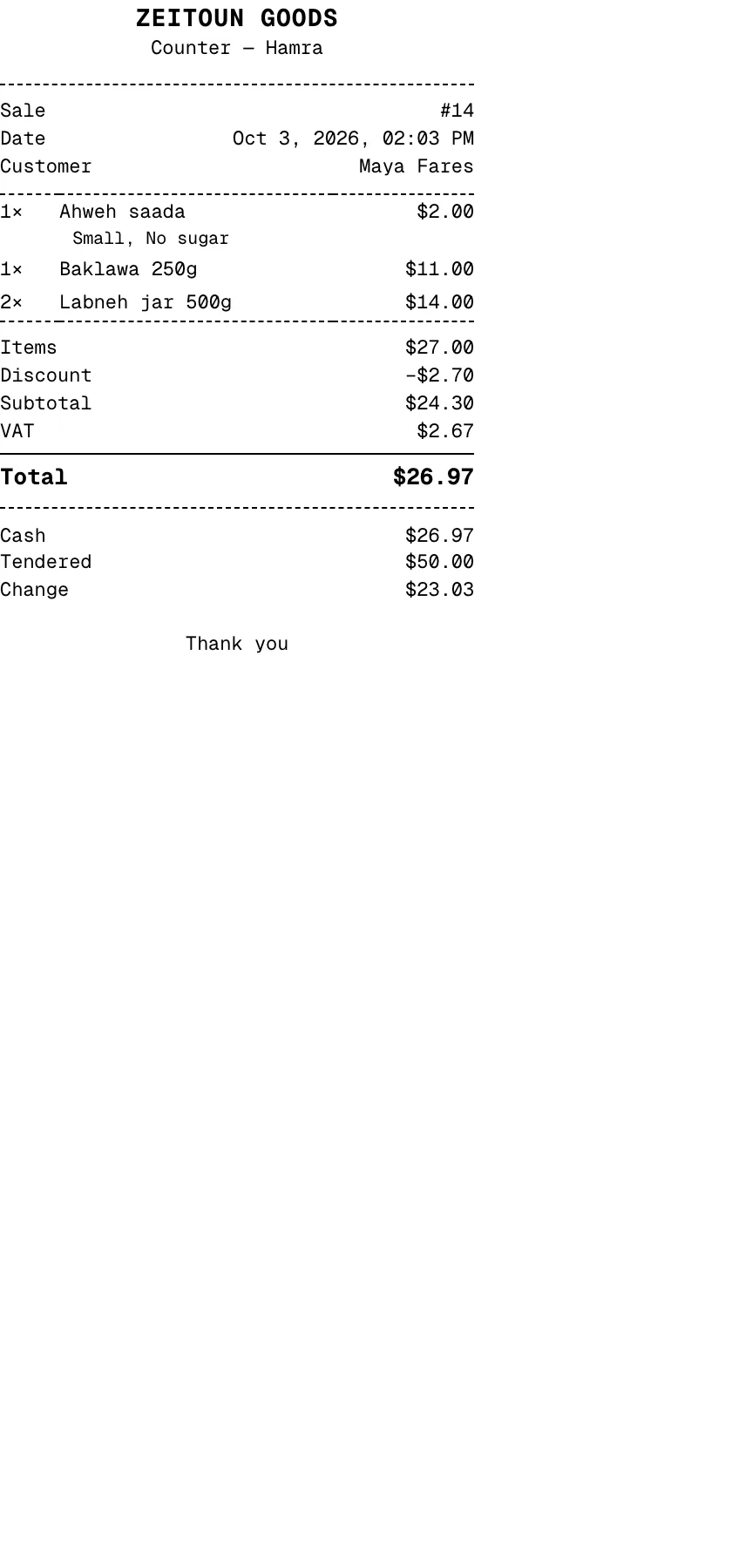
ReceiptDocument.tsx is printed with window.print() from a hidden node attached directly to body.
- Print CSS (
index.css) hides everything else and sets the page to 80 mm (72 mm content, monospace). - Content:
- shop, branch, sale number, date and customer
- lines with modifiers and notes, priced at list
- discounts, subtotal and VAT (or "Includes VAT")
- each payment, with tendered and change for cash
- the code or reason applied
- REPRINT, then "Thank you"
- Limits: printing works only from the post-sale dialog, with no reprint from history. There's no ESC/POS, no drawer kick and no digital receipt.
Drawer lifecycle
| Step | Component | Behaviour |
|---|---|---|
| Open | OpenDrawer.tsx | Float may be 0. The button stays disabled after success to avoid a double open. |
| Move cash | CashMovementDialog.tsx | drop / pay_out / pay_in, amount > 0, reason required. A pay-out also needs an expense category, with empty and error states that suggest a Drop instead. |
| Close | CloseDrawer.tsx | Blind count: the counted amount and an optional note come first, then Expected / Counted / Balanced·Short·Over. Disabled while the basket has items. |
| History | DrawerHistory.tsx | Three levels: my drawers (by day, variance chip), one drawer (float, expected/counted/variance once closed, Taken per tender, movements), transactions (by payment or by sale, split parts, Refund badges) |
For an open drawer, history shows a padlock note in place of expected cash (ADR 0001).
Taken counts sales only; refunds aren't subtracted.
The local tenderLabel in DrawerHistory.tsx renders wallet as "Wallet", while every other screen says Whish.
Customers
CustomerDialog.tsx, CustomerFormDialog.tsx, lib/phone.ts:
- Search: 250 ms debounce, 50 per page, "Show more".
- Form fields: full name and phone (required), nickname (optional).
- Phone:
- A dropdown of 19 country codes, with Lebanon first.
- A typed
+or00prefix overrides the dropdown. A leading 0 is stripped. Length is checked against E.164. - A live duplicate check (450 ms) warns and offers "Use this customer" but doesn't block.
Attaching a customer doesn't change pricing.