Merchant dashboard
Routes & screens
Every dashboard route, the permission it needs, and the implementation details worth knowing. For the user-facing description, see the product tour.
Route table
| Route | Gate | Page |
|---|---|---|
| (signed out) | — | Login.tsx: email, then 6-digit OTP (auto-submits). Has its own language switch. |
/ | owner | Overview.tsx |
/orders | orders.view | Orders.tsx |
/orders/new | orders.create | NewOrder.tsx |
/orders/:id (+ panels) | owner | OrderDetail.tsx |
/customers, /customers/:id | customers.view / owner | Customers.tsx, CustomerDetail.tsx |
/products, /products/new, /products/:id/edit, /products/view-settings | products.view / products.write | Products.tsx, ProductEditor.tsx, ProductViewSettings.tsx |
/products/modifiers | products.view (edit: products.write) | Modifiers.tsx |
/categories | products.view | Categories.tsx |
/inventory | inventory.write | Inventory.tsx |
/jarde | inventory.write + app jarde | Jarde.tsx |
/discounts, /discounts/new, /discounts/:id/edit | discounts.view / discounts.write | Discounts.tsx, DiscountEditor.tsx (old /discounts/v2/* redirects) |
/sections, /sections/new, /sections/:id/edit | products.view / sections.write | Sections.tsx, SectionEditor.tsx |
/metadata/* | products.view | Metadata*.tsx (old /lists/* redirects) |
/staff, /staff/new, /staff/:id/edit | staff.manage (editor: owner) | Staff.tsx, StaffEditor.tsx |
/staff/roles/* | staff.manage (editor: owner) | StaffRoles.tsx, StaffRoleEditor.tsx |
/staff/discount-pins | owner | DiscountPins.tsx |
/locations/* | products.view | Locations.tsx, LocationEditor.tsx |
/packages, /carriers | orders.fulfill | Packages.tsx, Carriers.tsx |
/shipping (hidden) | orders.fulfill | Shipping.tsx |
/billing (hidden) | owner | Billing.tsx |
/reports | reports.view + app reports | Reports.tsx |
/apps | owner (others see why they can't change anything) | Apps.tsx |
/profile | owner | Profile.tsx |
* | — | Redirects to / |
The sidebar (components/nav.ts, AppSidebar.tsx) also shows a shop switcher, the plan name (owners only), an active-orders badge, and POS / Accounting launchers. It collapses to an icon rail, becomes a sheet on mobile, and mirrors in RTL.
Implementation notes
Overview
- The figures are computed client-side (
lib/analytics.ts) from up to 4 pages ofget-shop-orders, including archived orders, because the analytics endpoints aren't served. - The page labels the window it covers. There are no period comparisons.
- The alerts strip comes from
get-shop-alerts.
Orders
- Filters live in a drawer. The sales channel enum is in
lib/order.ts:96. - Row actions: one
get-order-actionscall per page decides which rows get the payment menu (OrderPaymentMenu.tsx). - New order:
- Lines are grouped by source location, or
autoRoutelets the server choose. - A price override is sent only if the merchant typed one. Line discounts can be an amount or a percent (PR #63).
- Tax shows "—", because only the server knows the rate.
- The order is always created unpaid. A dirty form warns before you leave.
- Lines are grouped by source location, or
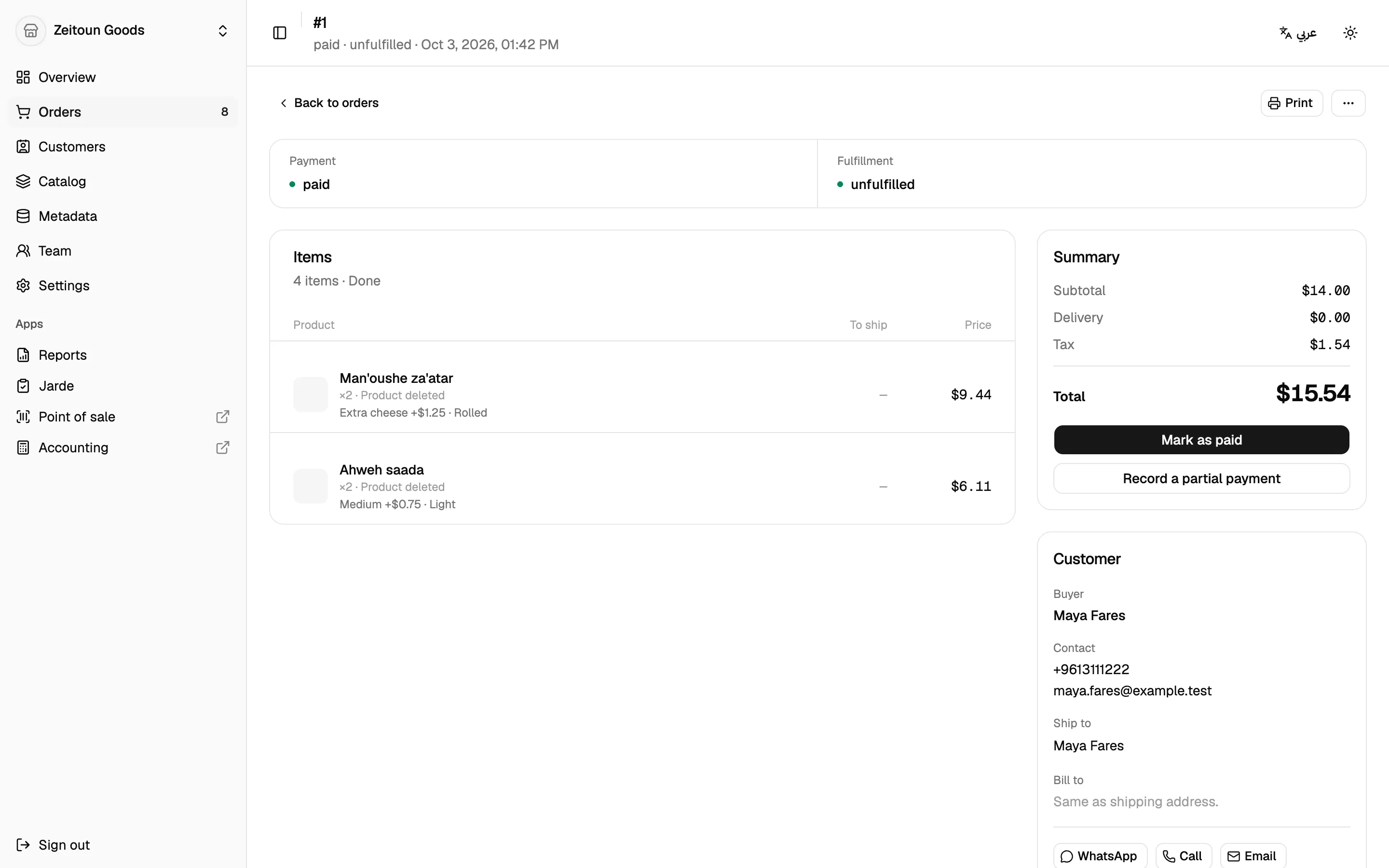
- Order detail:
- Panels are nested routes:
fulfill/:foId,tracking/:fulfillmentId,refund,return,returns/:rid/receive,returns/:rid/tracking/:rfoId. - Every button comes from
get-order-actions/get-fulfillment-actions. - Print documents are in
OrderPrintDoc.tsx+styles/print.css. - There's no timeline, because there's no endpoint for one.
- Panels are nested routes:
Products
- List:
search-productshits the configured backend (Postgres by default) when searching or filtering.- Facets come from filterable fields and are applied on Done.
- Status is derived from stock; there's no draft/active state.
- View settings are stored per shop in localStorage (
lib/productViewSettings.ts). - Import (
lib/productTransfer.ts):- Required columns:
product_key,title,price. - Other columns:
field.*,variant_field.*,stock_<locationId>, and more. - The whole file is validated, then create-only: rows with
product_idare skipped. Products are written one per request, with a partial-failure count.
- Required columns:
- Export: CSV (with BOM) or XLSX, in the same format as import.
- Editor:
- Saves the full product every time (desired-state
set-product). - Refuses to edit a multi-variant product that has no options, to avoid damaging it.
- Modifier group checkboxes save immediately.
- Margin colours: ≥ 35% green, ≥ 20% amber, otherwise red.
- Media goes to Cloudinary via a signed upload (
MediaUploader.tsx).
- Saves the full product every time (desired-state
Catalogue
- Categories import/export (
lib/categoryTransfer*.ts):title+parent_1..ncolumns. Existing paths are skipped, and parents are created first. - Metadata:
- New fields can be text, rich text, integer, decimal, boolean, date or URL.
- JSON and reference fields still open, but new reference fields can't be created for now.
- The entry-type field editor is commented out (
MetadataEntryTypeDetail.tsx:208-237).
- Sections: drag-reorder saves immediately. Dangling items are flagged.
Inventory & Jarde
- Adjust sets an absolute quantity with reason
manual. Transfer moves stock between branches. Transfer selected (PR #62) sends the selected rows totransfer/bulk, all or nothing. History shows movements across all branches. - Jarde parses sheets in
lib/jarde.ts, then callsplanandapply.
Team
- Phone fields all use the country-code picker (staff since PR #65). Israel and US-embargoed countries are excluded from phone and country pickers (PR #64,
lib/countries.ts). - Role editor: permissions are grouped as served by
get-staff-permissions.CategoryScopePickersets catalogue scope. - Staff editor:
RoleAssignmentEditorsets role × locations. Ticking every branch saves asall. - Discount PINs: shown once, with a copy button.
Settings & apps
- Locations:
AddressSearch→ places proxy, and a draggable pin reverse-geocodes. Required: name, country, city, address line 1, coordinates. The Shelves panel depends on theshelvesapp. - Store profile: saves the full shop record, leaving flat shipping rate and country untouched. Language, currency and weight unit come from the API lists.
- Reports:
- The report list, filters and columns all come from the server.
- 10 rows per page.
- Print and Excel export re-run the report for up to 500 rows, keeping group headers and subtotals, and say so when the result is truncated.
- AI assistant (
components/assistant/*): behindVITE_ASSISTANT_ENABLED. Replies come from a local stub, not a model.